Your day, but structured. Finally.
Plan your day in 5 minutes. Review your week in 15.
A calendar for time blocks, one ordered list of todos, and notes, on one screen. Each morning a short review decides what comes along and what matters most. Each week you look back, and set what moves your goals next.
Free during early access · every feature · no card needed
You have tried the complicated way.
It didn't work.
A todo list that only grows, a calendar in another tab, and goals in a document you open once a year. Here is a different approach: a few small rituals, and a tool built around them.
The usual way
- Todos roll over forever, until the list means nothing
- Everything feels equally urgent
- Separate apps for schedule, tasks and notes
- Goals with progress sliders you forget to move
The TimeBlockingApp way
- A todo that keeps rolling over asks you to decide
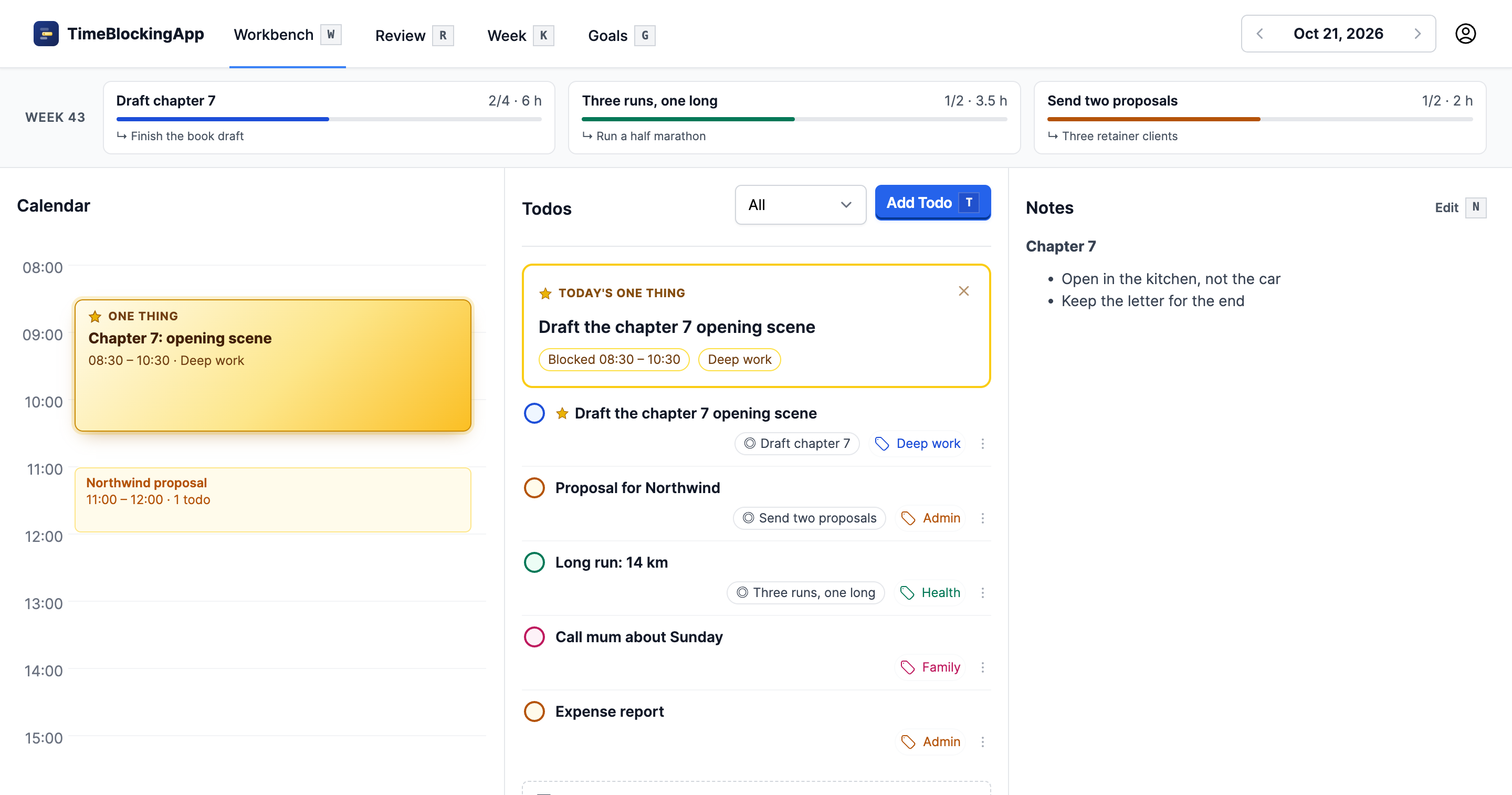
- One Thing a day, with time blocked for it
- Calendar, todos and notes side by side
- Goal progress worked out from the work you link to them
Every morning · about 5 minutes
Daily review
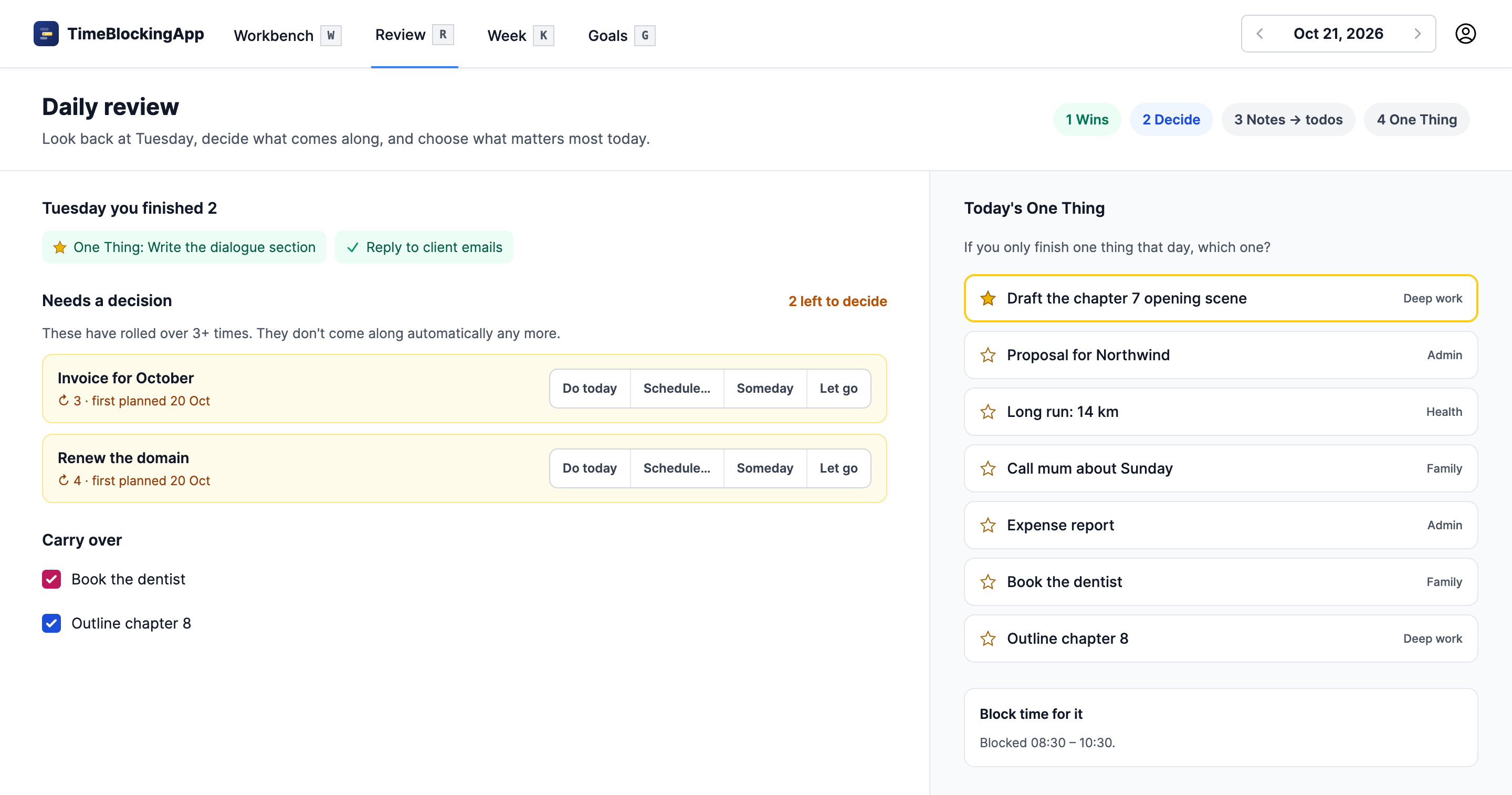
Review the days since your last review, decide what comes along, and choose what matters most today.
- Start with what you finished yesterday.
- Unfinished todos come along with one click. One that has rolled over 5 times, or as often as you choose, waits for a decision: do it today, schedule it, put it on Someday, or let it go.
- Turn yesterday's notes into todos.
- Pick today's One Thing, and block time for it.
All day
The One Thing
If you only finish one thing today, which one? Choose it in the morning, and the workbench keeps it in front of you.
- Pinned above your list, and in gold on the calendar.
- Blocked for two hours in the first free slot of your work hours, or wherever you drag it.
- Hover over any todo and press 1 to make it the One Thing.
Every week · about 15 minutes
Weekly review
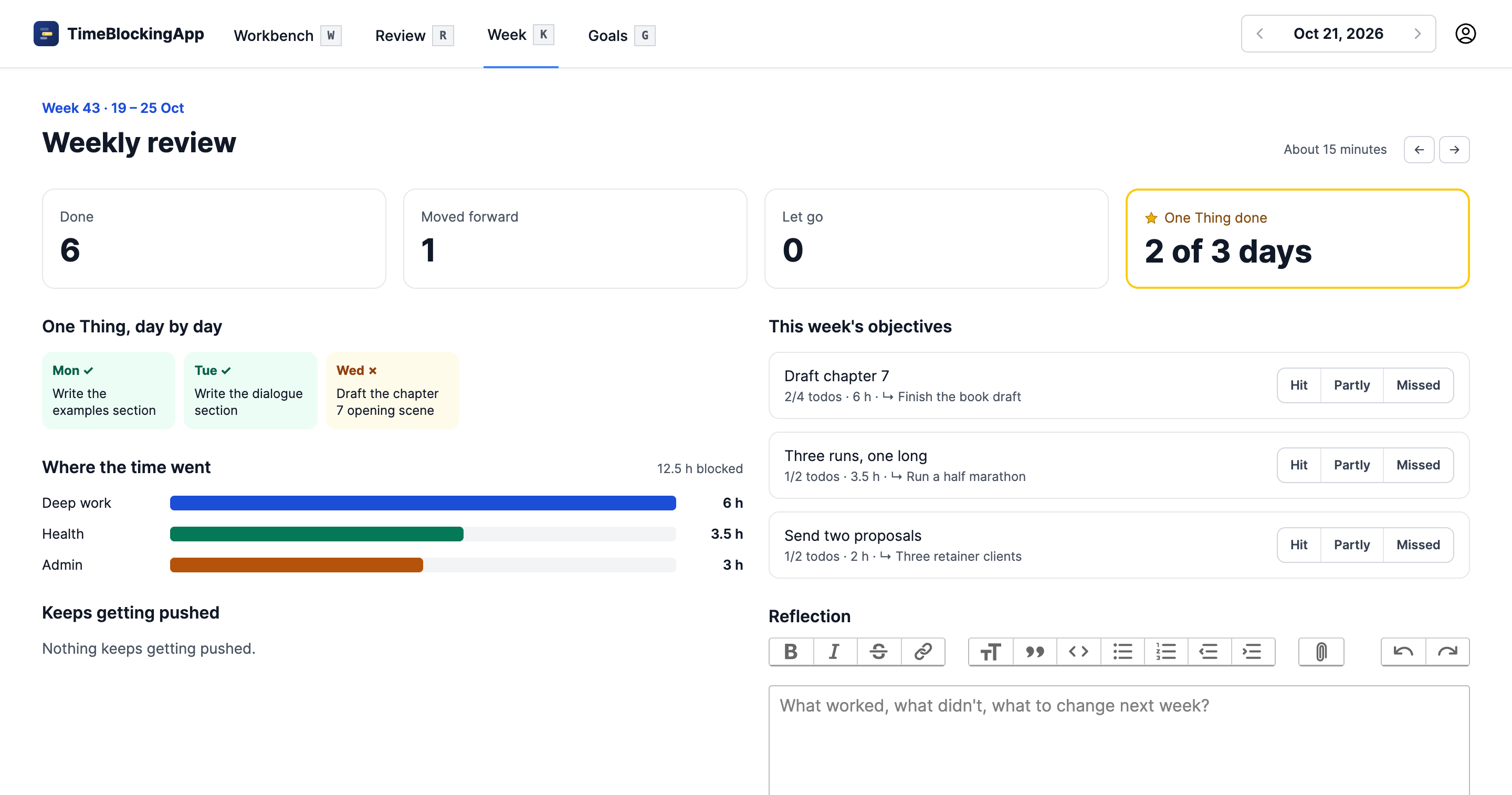
On your review day a banner invites you to look back. The numbers are already there, so the fifteen minutes go to thinking.
- What got done, moved forward and let go, worked out from your days.
- Your One Thing day by day, and where the time went per category.
- The todos that keep getting pushed.
- Rate this week's objectives, write a short reflection, and set next week's.
Every year
Goals
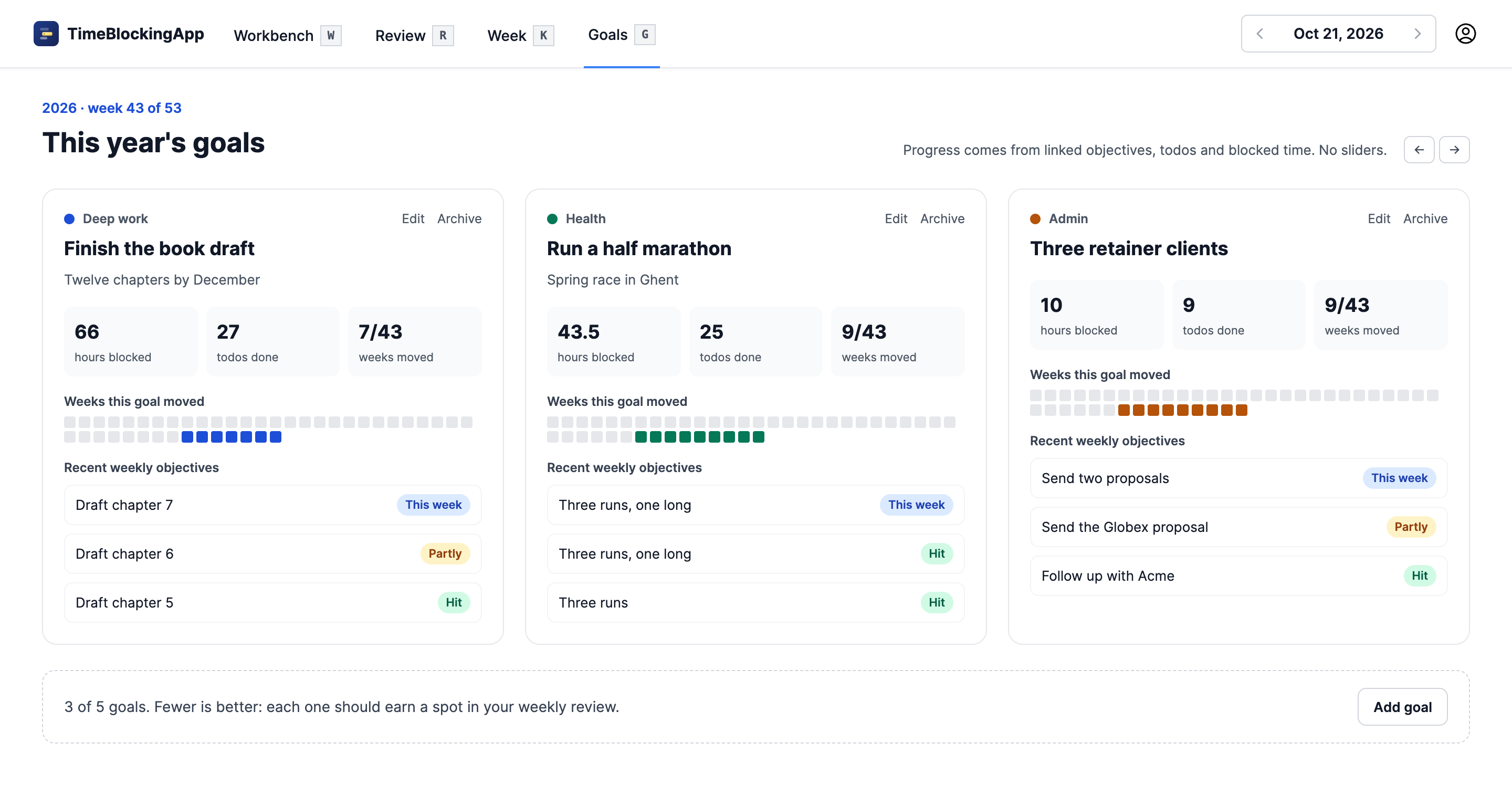
A few yearly goals become this week's objectives, and those become today's todos. You see which goals your weeks actually moved.
- At most five goals a year, and at most three objectives a week.
- Link an objective to a goal, and todos to the objective.
- Progress counts the hours blocked, the todos done and the weeks a goal moved. No sliders.
And what holds it together
One screen for the day
The workbench puts the calendar, your ordered todo list and the day's notes side by side. Drag a todo onto the calendar to give it time.
Your other calendars, alongside
Add the iCal links of your work and family calendars. Their events show on your day, read-only, and the One Thing's block avoids them.
On your phone
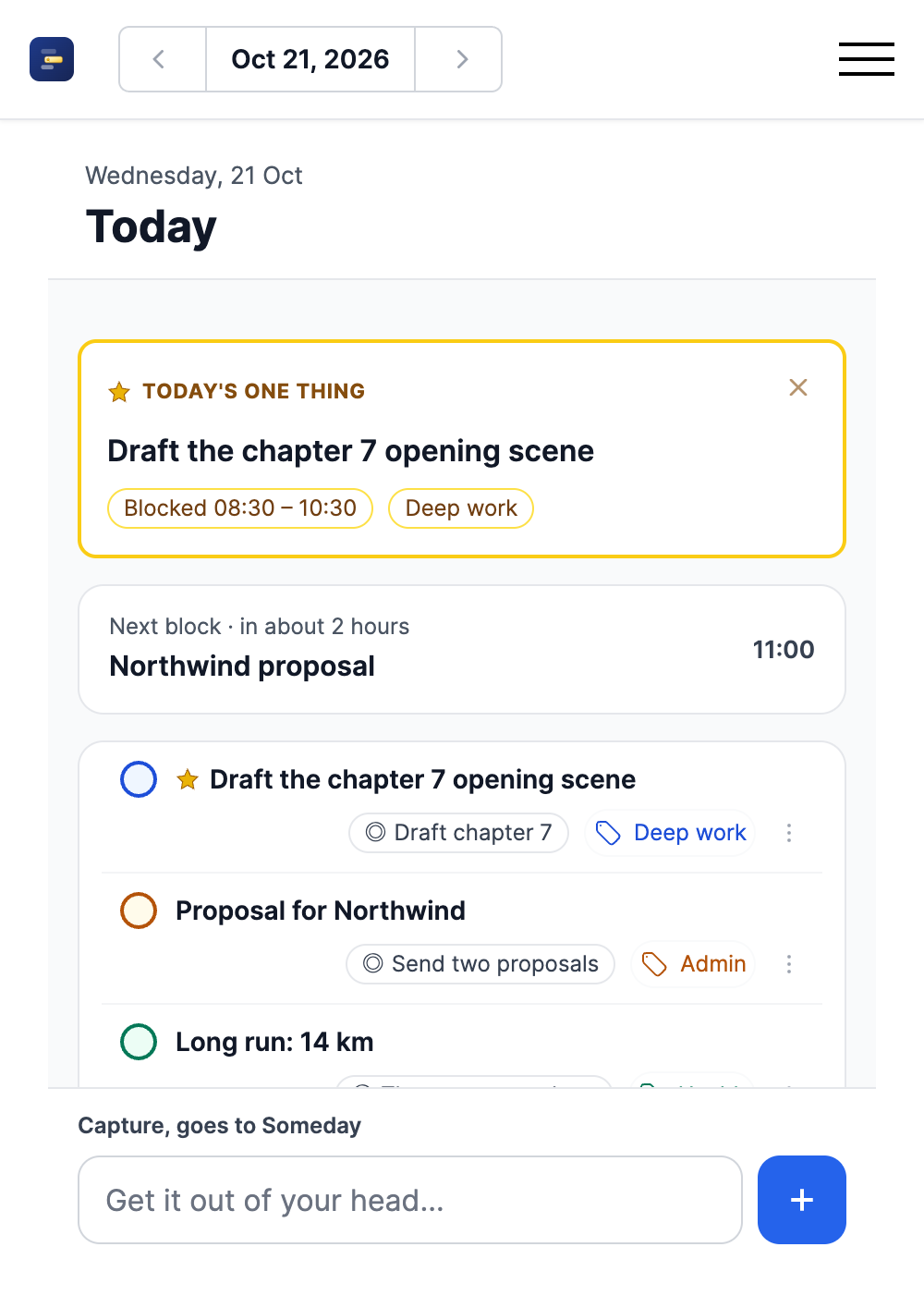
Add it to your home screen. It opens on Today: your One Thing, today's todos, and a field to capture a thought for Someday.
Suggestions, if you want them
Turn them on in settings, and a new todo gets its category and objective suggested from your own history, and a new objective its goal. Off unless you choose it: only then are titles sent to TypeSafe, the model behind them.
Free during early access
TimeBlockingApp is new. While it's in early access, everything in it is free. A good moment to start your rituals.
Every feature
Daily and weekly reviews, the One Thing, goals, your other calendars and the phone view. Nothing held back.
No card needed
Sign up with your email address or a passkey. There is nothing to pay.
Started in minutes
Plan today on the workbench. Tomorrow morning, your first review shows you around.
Questions
- What is time blocking?
- Giving your work a place in your calendar: a block of time for one task, or a group of similar ones. It keeps you focused, and makes sure the most important work gets the time it needs.
- How is this different from a todo app?
- A todo app keeps lists. TimeBlockingApp plans days: each day has its own list, a One Thing and time blocks, and the morning review decides what comes along from the day before. Nothing piles up quietly.
- What happens to todos I keep putting off?
- After 5 roll-overs a todo stops coming along by itself. You can make that stricter or looser in settings. The review asks you to do it today, schedule it for a later day, move it to Someday, or let it go.
- What if my day gets interrupted?
- It will. Drag the blocks around, reorder your list, and protect the One Thing if you can. Tomorrow's review picks up whatever didn't get done.
Stop managing your productivity system.
Start using one.
Tomorrow morning, five minutes. The rest follows.
Start for freeFree during early access. Every feature, no card needed.